


How optimised SQL Server environments improve reliability, scalability and business confidence.

Microsoft SQL Server plays a central role in many business critical systems, from finance and reporting platforms to customer portals and operational applications. When performance begins to decline, the impact is often felt across multiple departments, not just within IT.
While systems may appear stable on the surface, performance issues tend to build gradually. Without regular optimisation and configuration reviews, even well designed SQL environments can become inefficient, costly to operate, and increasingly difficult to scale.
Microsoft SQL database services focused on proactive performance optimisation help organisations protect reliability, control costs, and improve confidence in their data platforms.
Why SQL Server Performance Issues Creep in Over Time?
SQL Server environments rarely fail overnight. Instead, performance slowly degrades as business usage grows and systems evolve.
Common contributing factors include:
- Increasing data volumes that strain storage and memory resources
- New applications or reporting tools adding unexpected workload
- Indexes becoming fragmented or outdated
- Configuration settings that no longer match current usage patterns
- Infrastructure changes that affect how resources are allocated
Without routine health checks and tuning, these small inefficiencies accumulate. Over time, systems that once performed well can become unpredictable and difficult to manage.
This is why SQL Server support should focus on continuous optimisation rather than waiting for visible failures to occur.
The Business Impact of Poor SQL Performance
When SQL Server performance drops, the consequences extend well beyond technical inconvenience.
Business risks often include:
- Slower transaction processing and reporting delays
- Reduced productivity for staff relying on data driven systems
- Increased risk of system outages during peak usage
- Customer dissatisfaction caused by slow applications
- Higher infrastructure costs as hardware is added to mask inefficiencies
In many cases, organisations respond by upgrading servers or expanding cloud resources. While this may provide short term relief, it does not address the underlying performance issues within the database configuration and query behaviour.
True SQL performance optimisation focuses on making better use of existing resources before adding new ones.
What SQL Performance Optimisation Actually Involves?
Effective SQL performance optimisation is not based on guesswork or isolated fixes. It relies on structured analysis of how the database is being used in real conditions, followed by targeted improvements that address specific inefficiencies. By understanding workload patterns, resource consumption, and system behaviour, optimisation efforts can focus on changes that deliver measurable performance gains and long term stability.
Health Checks and Baseline Analysis
A comprehensive health check provides a clear picture of how the SQL Server environment is performing today while also identifying early warning signs of future issues. This process reviews resource usage trends, query execution behaviour, index health, backup reliability, and system logs to uncover inefficiencies or configuration risks.
Establishing baseline performance data also makes it easier to measure the impact of future changes and track gradual performance drift before it affects users.
Indexing Strategy
Indexes play a critical role in how quickly SQL Server can retrieve data, but over time they can become inefficient or misaligned with changing workloads. Poorly designed or outdated indexes increase query response times and place unnecessary load on storage and memory resources.
Ongoing optimisation focuses on removing redundant indexes, improving index structures for high usage queries, and reducing maintenance overhead, which together can significantly improve performance without requiring additional hardware investment.
Memory Configuration
SQL Server depends heavily on available memory to cache data and execute queries efficiently. When memory settings are not properly configured, the database may compete with other services on the server or suffer from frequent disk access, both of which reduce performance.
Optimising memory allocation ensures SQL Server has sufficient resources to handle peak workloads while maintaining overall system stability and preventing sudden slowdowns during high demand periods.
MAXDOP and Parallel Processing Settings
MAXDOP determines how many processor cores SQL Server can use to process individual queries. When this setting is misconfigured, it can lead to excessive CPU contention or inefficient query execution, particularly in environments with mixed workloads.
Proper performance tuning ensures that parallel processing is used where it adds value, while maintaining balanced resource usage across the system. This is especially important for reporting and analytical queries that can place heavy demands on processing resources.

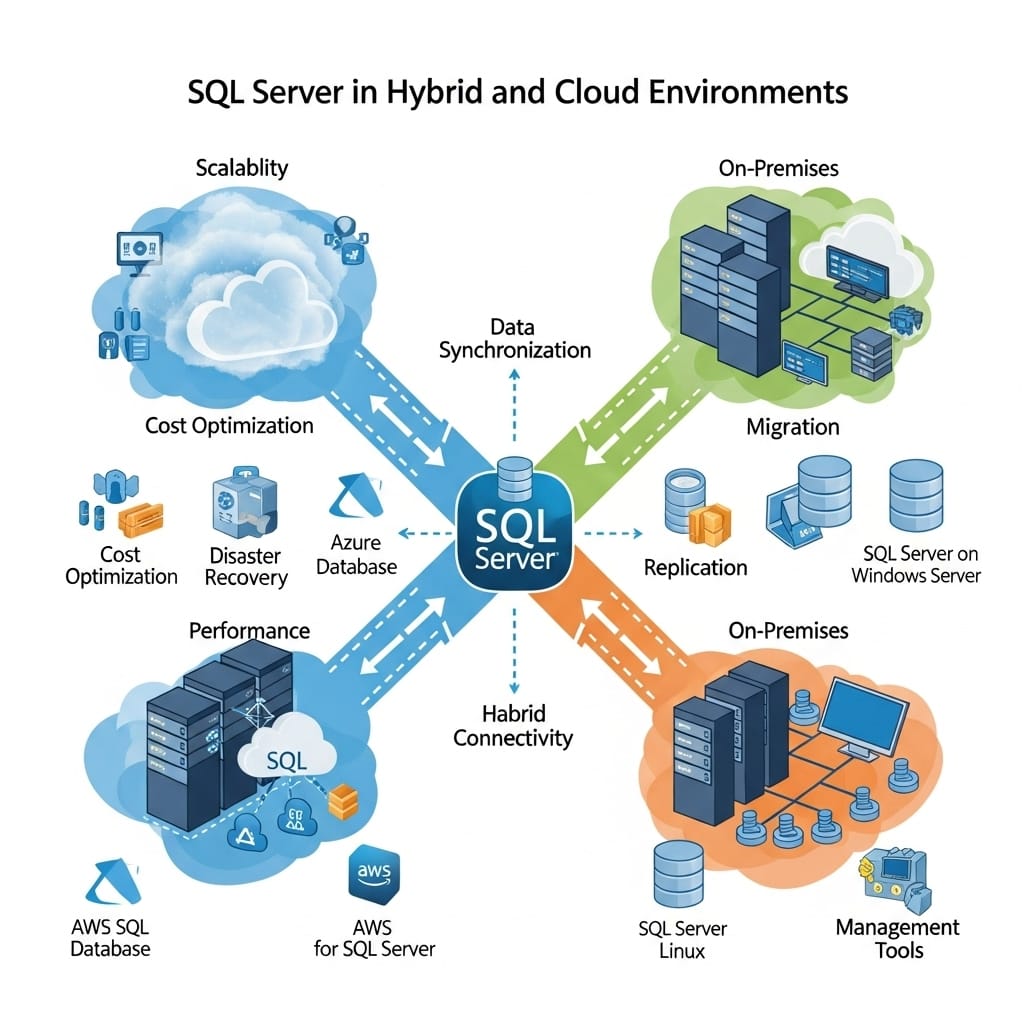
SQL Server in Hybrid and Cloud Environments
Many organisations now operate across a mix of on-premises systems and cloud platforms such as Azure SQL, each bringing its own performance and management considerations.
Key factors to consider include:
- Network latency between applications and databases in both on-premises and cloud setups
- Resource scaling models, particularly the flexibility offered by cloud platforms like Azure SQL
- Cost visibility and performance trade-offs between running workloads on-premises versus in the cloud
- Ensuring backup, disaster recovery, and compliance alignment across hybrid environments
Microsoft SQL database services help businesses implement consistent performance optimisation and security standards across hybrid environments while keeping costs under control.
Choosing between Azure SQL and on-premises deployments depends on workload characteristics, regulatory requirements, budget preferences, and long-term scalability goals rather than following trends.
| Feature / Consideration | On-Premises SQL Server | Azure SQL (Cloud) |
| Control | Full control over hardware, configuration, and security | Limited control; relies on managed services and built-in platform features |
| Scalability | Requires manual scaling with additional hardware | Automatic or easy scaling based on workload demand |
| Maintenance | IT team handles patching, backups, and upgrades | Automated patching, backups, and updates managed by Azure |
| Cost Model | CapEx-heavy; upfront hardware and maintenance costs | OpEx model; pay-as-you-go based on usage |
| Compliance & Security | Ideal for highly regulated workloads needing strict control | Provides compliance tools but may require additional configurations for sensitive data |
| Performance | Low latency if close to applications; predictable under load | Depends on network connectivity; can handle variable workloads efficiently |
Ongoing Optimisation Versus One Off Fixes
One time performance tuning can provide short term improvements, but it does not protect systems from future degradation.
Ongoing SQL Server support delivers greater long term value through:
- Continuous monitoring of workload changes
- Early detection of performance risks
- Regular configuration and index reviews
- Planned capacity management
- Reduced reliance on emergency troubleshooting
This approach ensures performance remains stable as business systems evolve, rather than waiting for visible failures before taking action.
From a financial perspective, ongoing optimisation also reduces the cost of reactive consultancy and unplanned infrastructure expansion.
Final Words
Microsoft SQL Server remains a critical platform for business operations, but it requires continuous care to deliver reliable and cost effective performance over time. Microsoft SQL database services that focus on proactive monitoring, configuration optimisation, and structured performance tuning help organisations maximise the value of their existing infrastructure while reducing operational risk.
Rather than relying on short term fixes, ongoing SQL performance optimisation provides predictable stability, improved scalability, and stronger business confidence.
Cyberdan delivers specialist SQL Server support designed to improve performance, control costs, and protect business critical data platforms. To assess the health and efficiency of your SQL environment, speak with Cyberdan about tailored Microsoft SQL database services aligned with your business and technical requirements.
FAQs
How do Microsoft SQL database services support business growth?
Microsoft SQL database services enable strategic planning and proactive management, helping organisations scale operations and make data-driven decisions confidently.
What advantages does SQL Server support provide for compliance?
SQL Server support ensures proper configuration, auditing, and secure access controls, helping businesses meet regulatory requirements and maintain governance standards.
How can SQL performance optimisation reduce operational costs?
Optimising SQL Server workloads minimises unnecessary resource usage, reduces downtime risks, and improves efficiency, leading to lower infrastructure and maintenance costs.
Are Microsoft SQL database services suitable for small and medium enterprises?
Yes, tailored services can support businesses of all sizes, providing expert guidance, monitoring, and optimisation without the need for a large in-house IT team.
Can SQL Server support improve disaster recovery readiness?
SQL Server support enhances backup strategies, failover processes, and recovery planning, ensuring business continuity in case of outages or unexpected incidents.


